
Nothing can go wrong
No real calls, texts, purchases or settings. They can press anything, and their real phone is never touched.
SafePhone is a pretend phone that runs in the web browser. Your mom or dad can try every button, follow short step-by-step lessons and make mistakes safely, because nothing in it is real: no real calls, texts or payments.
Not together right now? Email me the link to try it with them later.
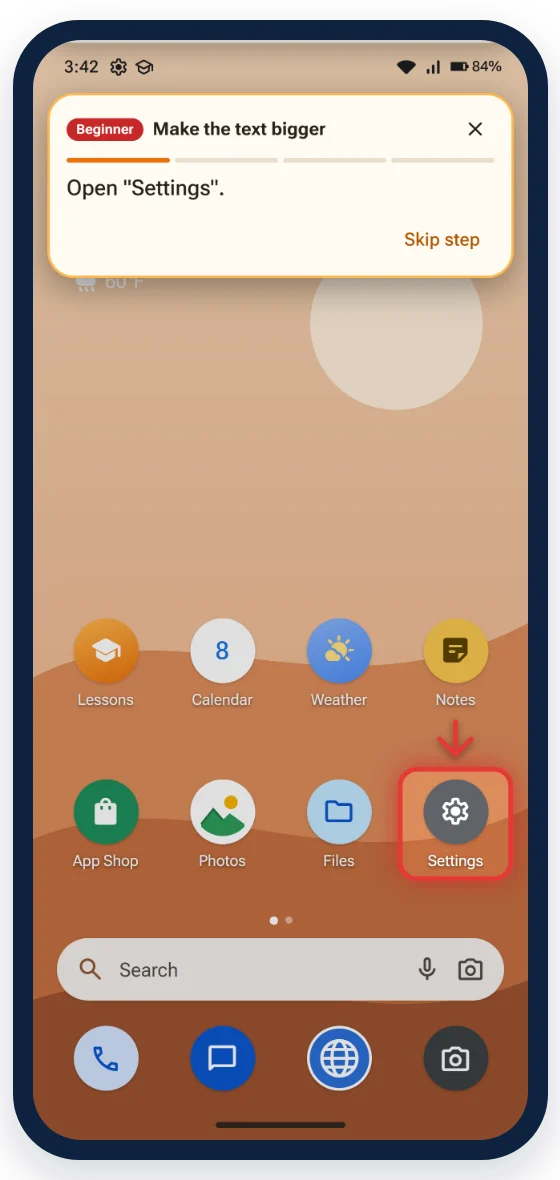
Watching you tap quickly on their phone doesn't stick. Doing it themselves, at their own pace, does.
No real calls, texts, purchases or settings. They can press anything, and their real phone is never touched.
On the Beginner level, each step is circled and written in plain English. When they're ready, the Intermediate and Advanced levels give fewer hints.
144 lessons of a few minutes each, from unlocking the phone to sending a photo to the grandkids.
Teaching them yourself? Read our guide: How to teach an older parent to use a smartphone, with a plan for the first week.
The first 5 lessons, with a free account. No card needed.
Every phone lesson: $9.99 a month, or $81.99 a year. Cancel anytime.
SafePhone and SafePC, the practice computer: $12.99 a month, or $105.99 a year.
Does your parent have an iPhone? SafePhone looks like an Android phone today, and an iPhone style is coming soon. Get an email when it's ready.
Does your parent have an iPhone? SafePhone has an iPhone style too. Try a lesson in the iPhone style, no account needed.
Want to pay for them? Give 12 months as a gift: one payment, no renewal.
No. SafePhone opens in any web browser: on a phone, a tablet or a computer. Many people start on a computer with a big screen, then try the same thing on their real phone.
No. It's a practice phone inside the browser. Nothing they do in it reaches their real phone, their contacts or their money.
Yes. SafePhone works like a typical modern smartphone. The ideas (where Settings are, how to go back, what a scam text looks like) carry over to most phones.
Yes. Sign in to their account on your own device, choose a plan in "My account" and pay with your card. They keep their own account and progress.
An account is used on one device at a time. If they sign in somewhere else, the first device is signed out, and their progress is saved either way.
Set it up together in 2 minutes. The first 5 lessons are free.
Subscribe to the TryTechSafe newsletter: one short email a month with phone and computer tips for you and your parents.